
MENU

MENU

Design. Build. Code

Project-based approach to teaching designing, robotics and coding

We follow K-12 Computer Science Standards.

AI-Powered Innovation Meets Hands-On Fun: Transforming Learning Through Cutting-Edge Tools and Interactive Experiences.

Define the Problem

Brainstorm

Discuss

Prototype

Experiment & Test

Present & Share

Introductory. Beginner. Intermediate. Advanced Levels.

Projects based on age and skill level. Clear path to growth and achieving true potential.

DESIGN

3D Modeling, Designing & Printing

BUILD

Build smart robots with various materials and tools

CODE

Learn to code using block-based or text-based languages, and in augmented and virtual reality

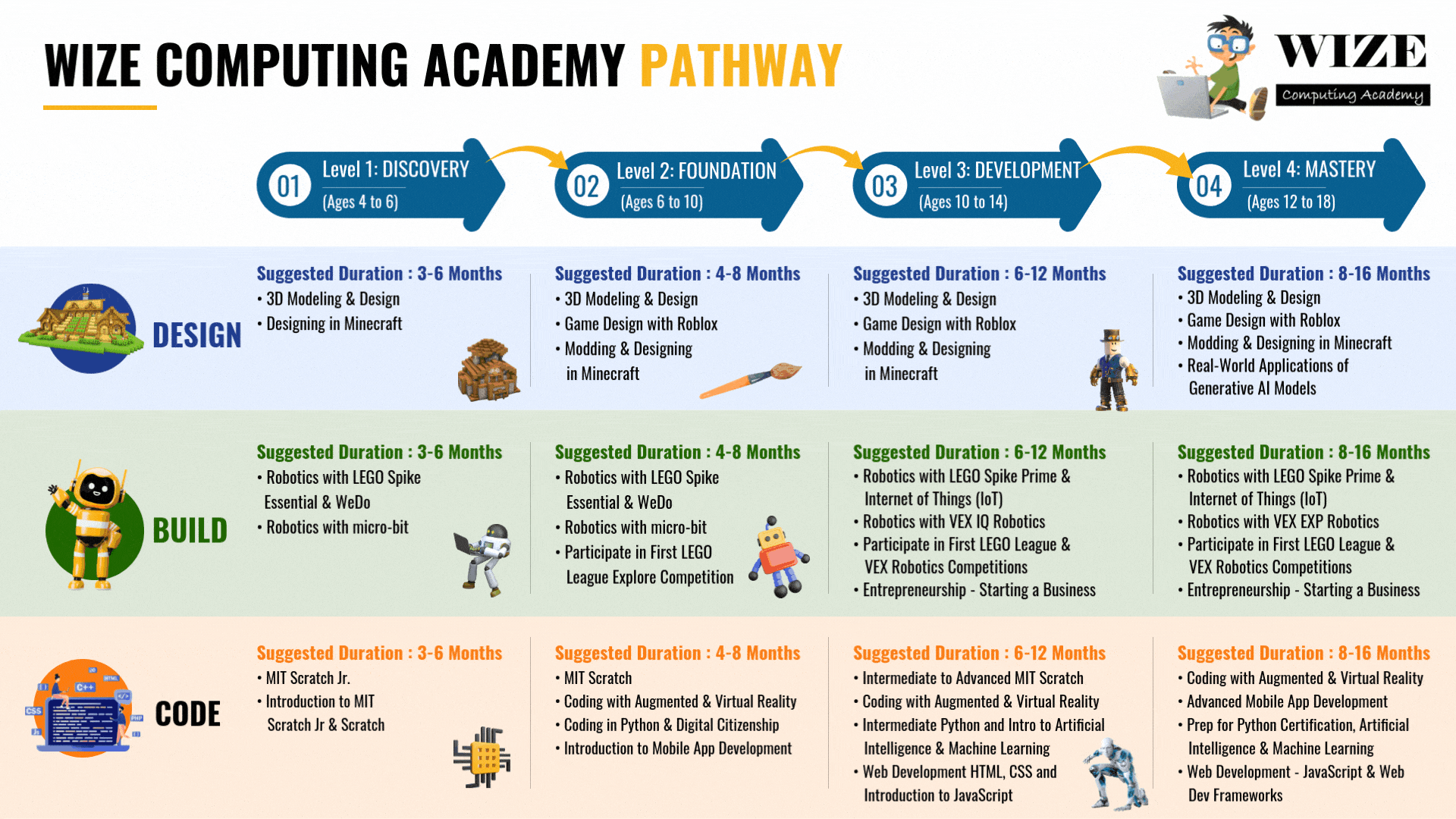
Wize Computing Academy Pathway for different levels

The full design, build & code curriculum pathway is designed to provide comprehensive education experience that covers both breadth and depth in various computer science topics and teaches real-world, 21st century skills to our learners.

01
Level 1: DISCOVERY
(Ages 4 to 6)
02
Level 2: FOUNDATION
(Ages 6 to 10)
03
Level 3: DEVELOPMENT
(Ages 10 to 14)
04
Level 4: MASTERY
(Ages 12 to 18)
DESIGN
Suggested Duration : 3-6 Months
  • 3D Modeling & Design
  • Designing in Minecraft
Suggested Duration : 4-8 Months
  • 3D Modeling & Design
  • Game Design with Roblox
  • Modding & Designing in Minecraft
Suggested Duration : 6-12 Months
  • 3D Modeling & Design
  • Game Design with Roblox
  • Modding & Designing in Minecraft
Suggested Duration : 8-16 Months
  • 3D Modeling & Design
  • Game Design with Roblox
  • Modding & Designing in Minecraft
  • Real-World Applications of Generative AI Models
BUILD
Suggested Duration : 3-6 Months
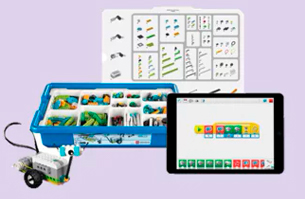
  • Robotics with LEGO Spike Essential & WeDo
  • Robotics with micro-bit
Suggested Duration : 4-8 Months
  • Robotics with LEGO Spike Essential & WeDo
  • Robotics with micro-bit
  • Participate in First LEGO League Explore Competition
Suggested Duration : 6-12 Months
  • Robotics with LEGO Spike Prime & Internet of Things (IoT)
  • Robotics with VEX IQ Robotics
  • Participate in First LEGO League & VEX Robotics Competitions
  • Entrepreneurship - Starting a Business
Suggested Duration : 8-16 Months
  • Robotics with LEGO Spike Prime & Internet of Things (IoT)
  • Robotics with VEX EXP Robotics
  • Participate in First LEGO League & VEX Robotics Competitions
  • Entrepreneurship - Starting a Business
CODE
Suggested Duration : 3-6 Months
  • MIT Scratch Jr.
  • Introduction to MIT Scratch Jr & Scratch
Suggested Duration : 4-8 Months
  • MIT Scratch
  • Coding with Augmented & Virtual Reality
  • Coding in Python & Digital Citizenship
  • Introduction to Mobile App Development
Suggested Duration : 6-12 Months
  • Intermediate to Advanced MIT Scratch
  • Coding with Augmented & Virtual Reality
  • Intermediate Python and Intro to Artificial Intelligence & Machine Learning
  • Web Development HTML, CSS and Introduction to JavaScript
Suggested Duration : 8-16 Months
  • Coding with Augmented & Virtual Reality
  • Advanced Mobile App Development
  • Prep for Python Certification, Artificial Intelligence & Machine Learning
  • Web Development - JavaScript & Web Dev Frameworks

Explore Our Curriculum Overview
and Standards Alignment

Discover how our programs meet national and local educational standards, fostering real-world skills in coding, robotics, and design.

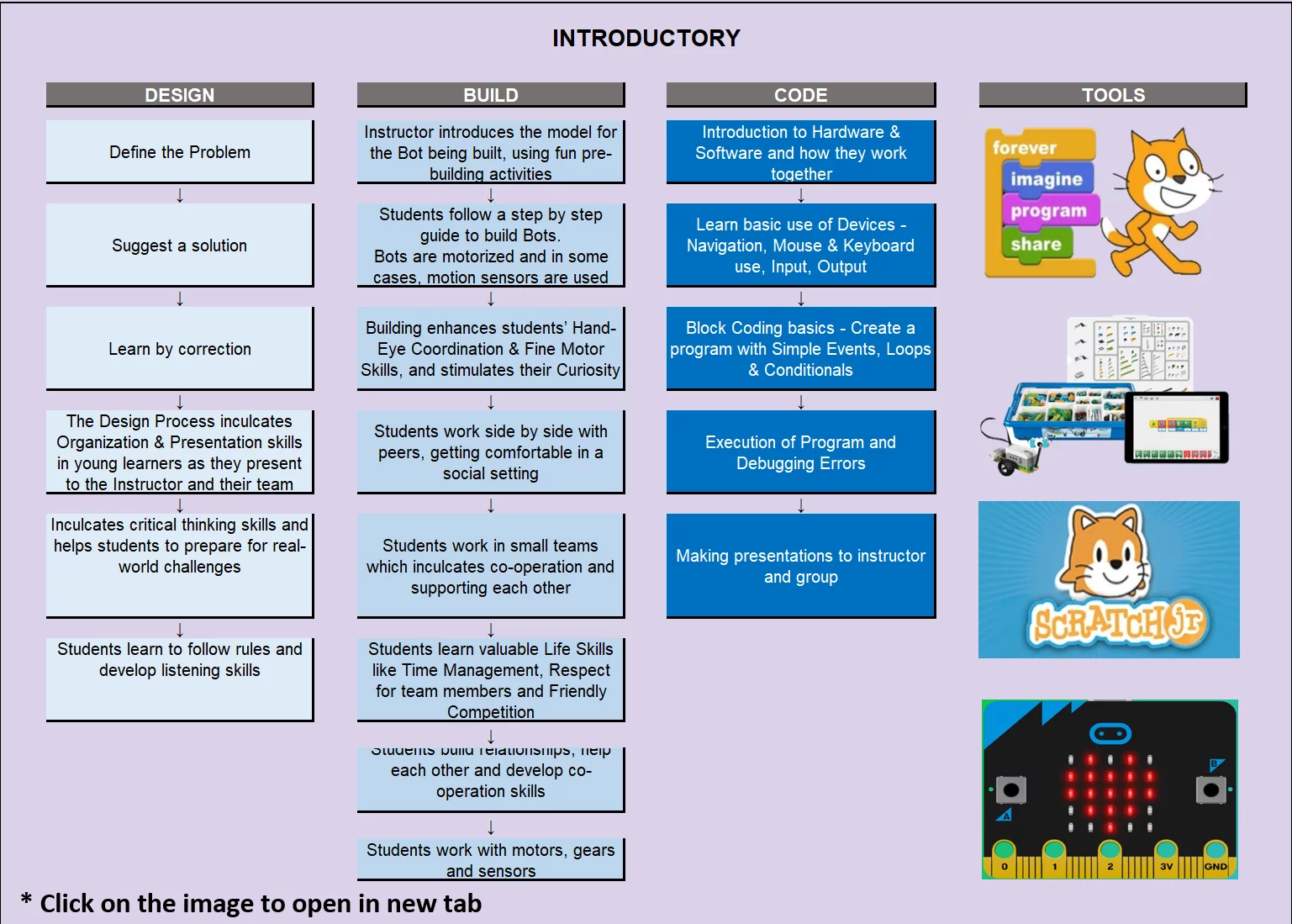
Introductory Level

DESIGN
Define the Problem
Suggest a solution
Learn by correction
The Design Process inculcates Organization & Presentation skills in young learners as they present to the Instructor and their team
Inculcates critical thinking skills and helps students to prepare for real-world challenges
Students learn to follow rules and develop listening skills
BUILD
Instructor introduces the model for the Bot being built, using fun pre-building activities
Students follow a step by step guide to build Bots. Bots are motorized and in some cases, motion sensors are used
Building enhances students' Hand-Eye Coordination & Fine Motor Skills, and stimulates their Curiosity
Students work side by side with peers, getting comfortable in a social setting
Students work in small teams which inculcates co-operation and supporting each other
Students learn valuable Life Skills like Time Management, Respect for team members and Friendly Competition
Students build relationships, help each other and develop co-operation skills
Students work with motors, gears and sensors
CODE
Introduction to Hardware & Software and how they work together
Learn basic use of Devices - Navigation, Mouse & Keyboard use, Input, Output
Block Coding basics - Create a program with Simple Events, Loops & Conditionals
Execution of Program and Debugging Errors
Making presentations to instructor and group
TOOLS
Scratch
Scratch
Scratch

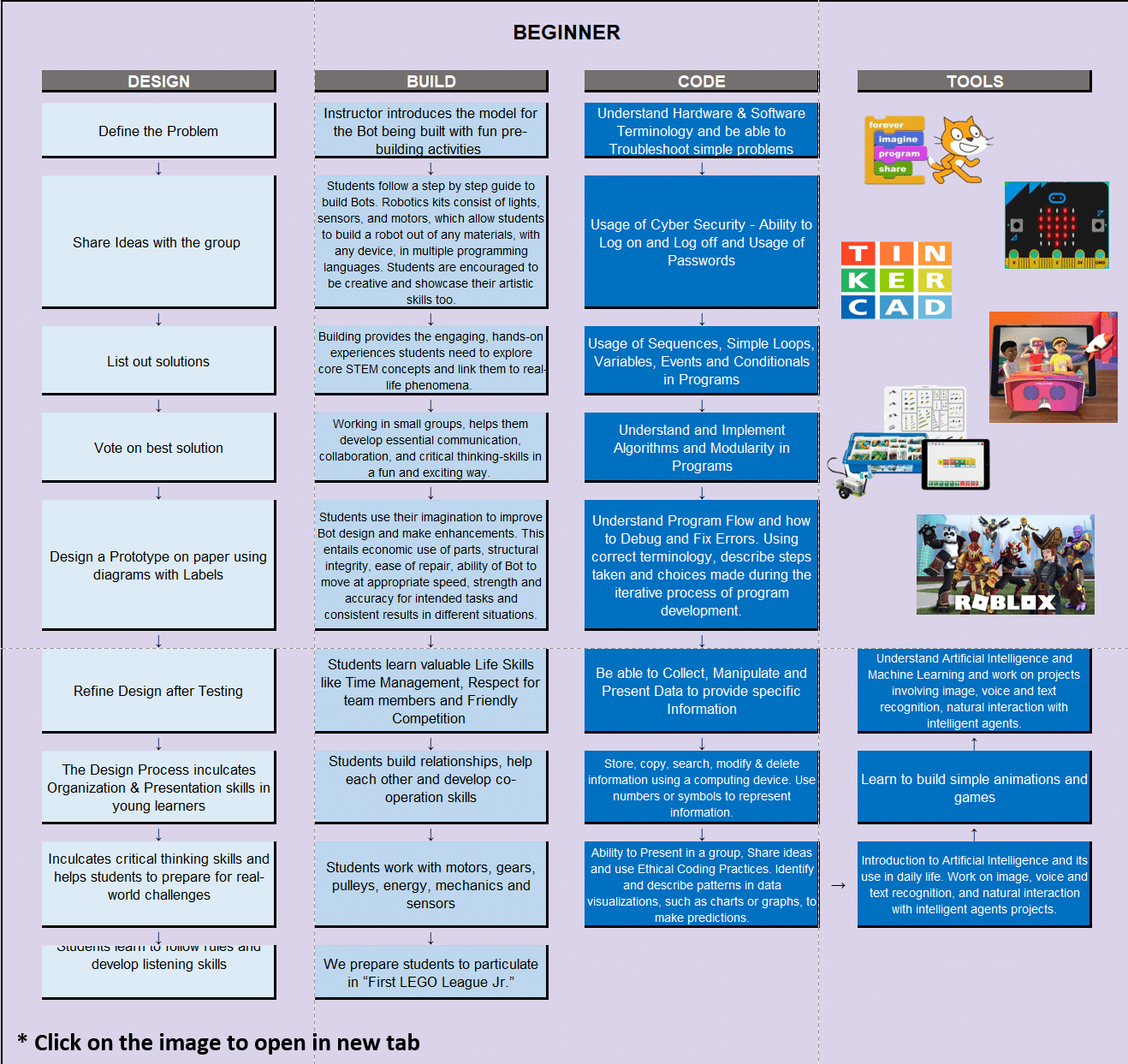
Beginner Level.

DESIGN
Define the Problem
Share Ideas with the group
List out solutions
Vote on best solution
Design a Prototype on paper using diagrams with Labels
Refine Design after Testing
The Design Process inculcates Organization & Presentation skills in young learners
Inculcates critical thinking skills and helps students to prepare for real-world challenges
Students learn to follow rules and develop listening skills
BUILD
Instructor introduces the model for the Bot being built with fun pre-building activities
Students follow a step by step guide to build Bots. Robotics kits consist of lights, sensors, and motors. They may also have to build a robot out of any materials, with any device, in multiple programming languages. Students are encouraged to be creative and showcase their artistic skills too
Building provides the engaging, hands-on experiences students need to explore core STEM concepts and apply them to real life phenomena
Working in small groups, helps them develop essential communication, collaboration, and critical thinking skills in a fun and exciting way
Students use their imagination to improve Bot design and make enhancements. This entails economic and work on resources, structural integrity, ease of repair, ability of Bot to move at appropriate speed, strength and accuracy for intended tasks and consistent results in different situations
Students learn valuable Life Skills like Time Management, Respect for team members and Friendly Competition
Students build relationships, help each other and develop co-operation skills
Students work with motors, gears, pulleys, energy, mechanics and sensors
We prepare students to participate in "First LEGO League Jr."
CODE
Understand Hardware & Software Terminology and be able to Troubleshoot simple problems
Usage of Cyber Security - Ability to Log on and Log off and Usage of Passwords
Usage of Sequences, Simple Loops, Variables, Events and Conditionals in Programs
Understand and Implement Algorithms and Modularity in Programs
Understand Program Flow and how to Debug and Fix Errors. Using correct terminology, describe steps taken and choices made during the iterative process of program development
Be able to Collect, Manipulate and Present Data to provide specific Information
Store, copy, search, modify & delete information using a computing device. Use numbers or symbols to represent information
Ability to Present in a group, Share Ideas and use Ethical Coding Practices. Identify different types of data, represent data in visualizations, such as charts or graphs, to make predictions
TOOLS
Scratch
Understand Artificial Intelligence and Machine Learning and work on projects involving image, voice and text recognition, natural interaction with intelligent agents
Learn to build simple animations and games
Introduction to Artificial Intelligence and its use in daily life. Work on image, voice and text recognition, and natural interaction with intelligent agents projects

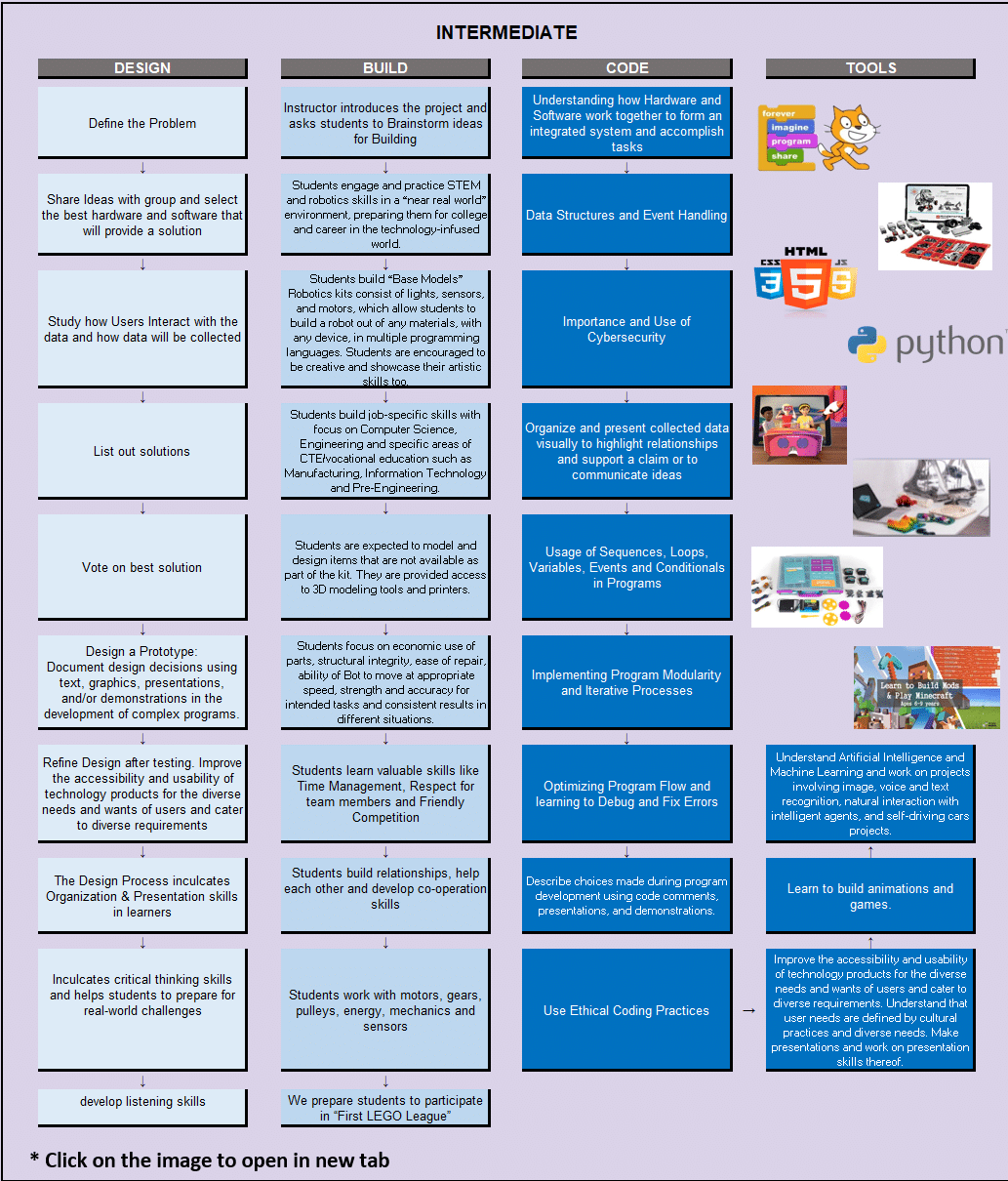
Intermediate Level.

DESIGN
Define the Problem
Share Ideas with group and select the best hardware and software that will provide a solution
Study how Users Interact with the data and how data will be collected
List out solutions
Vote on best solution
Design a Prototype: Document design decisions using text, graphics, presentations, and/or demonstrations in the development of complex programs
Refine Design after testing. Improve the accessibility and usability of technology products for the diverse needs and wants of users and cater to diverse requirements
The Design Process inculcates Organization & Presentation skills in learners
Inculcates critical thinking skills and helps students to prepare for real-world challenges
develop listening skills
BUILD
Instructor introduces the project and asks students to Brainstorm ideas for Building
Students engage and practice STEM and robotics skills in a "near real world" environment, preparing them for college and career in the technology-oriented world
Students build "Base Models" Robotics kits consist of lights, sensors, and motors, which allow students to build a robot out of any materials, with any device, in multiple programming languages. Students are encouraged to be creative and showcase their artistic skills too
Students build job-specific skills with focus on Computer Science, Engineering and specific areas of CTE/vocational education such as Manufacturing, Information Technology and Pre-Engineering
Students are expected to model and design items that are not available as part of the kit. They are provided access to 3D modelling tools and printers
Students focus on economic use of parts, structural integrity, ease of repair, ability of Bot to move at appropriate speed, strength and accuracy for intended tasks and consistent results in different situations
Students learn valuable skills like Time Management, Respect for team members and Friendly Competition
Students build relationships, help each other and develop co-operation skills
Students work with motors, gears, pulleys, energy, mechanics and sensors
We prepare students to participate in "First LEGO League"
CODE
Understanding how Hardware and Software work together to form an integrated system and accomplish tasks
Data Structures and Event Handling
Importance and Use of Cybersecurity
Organize and present collected data visually to highlight relationships and support a claim or to communicate ideas
Usage of Sequences, Loops, Variables, Events and Conditionals in Programs
Implementing Program Modularity and Iterative Processes
Optimizing Program Flow and learning to Debug and Fix Errors
Describe choices made during program development using code comments, presentations, and demonstrations
Use Ethical Coding Practices
TOOLS
๐Ÿฑ
forever
imagine
program
share
HTML5
CSS3 JS
๐Ÿ‘จโ€๐Ÿ’ป๐Ÿ‘ฉโ€๐Ÿ’ป๐Ÿ‘ถ
๐Ÿค–โš™๏ธ
๐Ÿ”ง
โš™๏ธ
๐Ÿ”ฉ
๐ŸŽจ
๐ŸŽฎ
๐Ÿ› ๏ธ
๐ŸŽฎ ROBLOX
Learn to build code & Play Games
Understand Artificial Intelligence and Machine Learning and work on projects involving image, voice and text recognition, natural interaction with intelligent agents, and self-driving cars projects
Learn to build animations and games
Improve the accessibility and usability of technology products for the diverse needs and wants of users and cater to diverse requirements. Understand that user needs are defined by cultural practices and diverse needs. Make presentations and work on presentation skills thereof

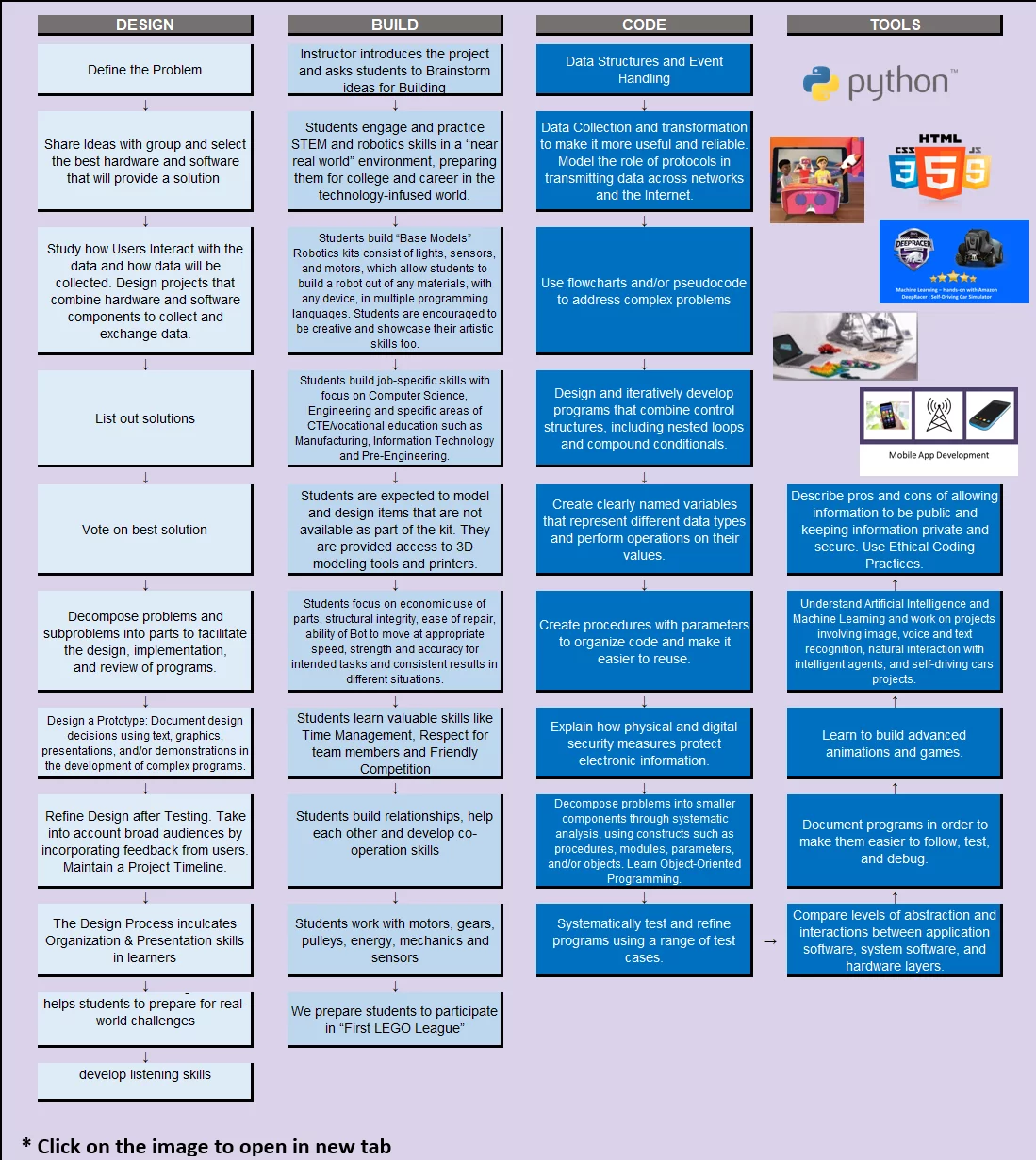
Advanced Level.

Advanced Curriculum
DESIGN
Define the Problem
Share Ideas with group and select the best hardware and software that will provide a solution
Study how Users Interact with the data and how data will be collected. Design projects that combine hardware and software components to collect and exchange data
List out solutions
Vote on best solution
Decompose problems and subproblems into parts to facilitate the design, implementation, and review of programs
Design a Prototype: Document design decisions using text, graphics, presentations, and/or demonstrations in the development of complex programs
Refine Design after Testing. Take into account broad audiences by incorporating feedback from users. Maintain a Project Timeline
The Design Process inculcates Organization & Presentation skills in learners
helps students to prepare for real-world challenges
develop listening skills
BUILD
Instructor introduces the project and asks students to Brainstorm ideas for Building
Students engage and practice STEM and robotics skills in a "near real world" environment, preparing them for college and career in the technology-infused world
Students build "Base Models" Robotics kits consist of lights, sensors, and motors, which allow students to build a robot out of any materials, with any device, in multiple programming languages. Students are encouraged to be creative and showcase their artistic skills too
Students build job-specific skills with focus on Computer Science, Engineering and specific areas of CTE/vocational education such as Manufacturing, Information Technology and Pre-Engineering
Students are expected to model and design items that are not available as part of the kit. They are provided access to 3D modelling tools and printers
Students focus on economic use of parts, structural integrity, ease of repair, ability of Bot to move at appropriate speed, strength and accuracy for intended tasks and consistent results in different situations
Students learn valuable skills like Time Management, Respect for team members and Friendly Competition
Students build relationships, help each other and develop co-operation skills
Students work with motors, gears, pulleys, energy, mechanics and sensors
We prepare students to participate in "First LEGO League"
CODE
Data Structures and Event Handling
Data Collection and transformation to make it more useful and reliable. Model the role of protocols in transmitting data across networks and the Internet
Use flowcharts and/or pseudocode to address complex problems
Design and iteratively develop programs that combine control structures, including nested loops and compound conditionals
Create clearly named variables that represent different data types and perform operations on their values
Create procedures with parameters to organize code and make it easier to reuse
Explain how physical and digital security measures protect electronic information
Decompose problems into smaller components through systematic analysis, using constructs such as procedures, modules, parameters, and/or objects. Learn Object-Oriented Programming
Systematically test and refine programs using a range of test cases
TOOLS
๐Ÿ‘จโ€๐Ÿ’ป๐Ÿ‘ฉโ€๐Ÿ’ป๐Ÿ‘ถ
HTML
CSS
JS
โญโญโญโญโญ
Minecraft Code Builder
Reviews & Ratings
๐Ÿ”ง
Parts
โš™๏ธ
Gears
๐ŸŽจ
Design
๐Ÿค–
Robot
๐Ÿ“ฑ ๐Ÿ“ก ๐Ÿ”Œ
Mobile App
Development
Describe pros and cons of allowing information to be public and keeping information private and secure. Use Ethical Coding Practices
Understand Artificial Intelligence and Machine Learning and work on projects involving image, voice and text recognition, natural interaction with intelligent agents, and self-driving cars projects
Learn to build advanced animations and games
Document programs in order to make them easier to follow, test and debug
Compare levels of abstraction and interactions between application software, system software, and hardware layers

Add Your Heading Text Here